Master Smart Home Notifications: 3 Advanced Settings for 25% Fewer Alerts by 2026
In the rapidly evolving landscape of home automation, our smart homes have become indispensable allies, offering convenience, security, and efficiency. From intelligent thermostats that learn our preferences to security cameras that keep a watchful eye, the promise of a truly connected dwelling is now a reality. However, with great connectivity comes a common challenge: the incessant stream of smart home notifications. If your phone buzzes more often with alerts from your smart devices than from actual human interaction, you’re not alone. The sheer volume of pings, chimes, and banners can quickly transform the convenience of smart living into a source of digital fatigue.
Imagine a smart home that truly understands your needs, delivering timely and relevant information without overwhelming you. A home where critical alerts stand out, and mundane updates remain in the background, only surfacing when truly necessary. This isn’t a futuristic dream; it’s an achievable reality through strategic customization of your smart home notifications. Our goal here is ambitious yet entirely within reach: to empower you with advanced settings that will help you reduce unnecessary alerts by a staggering 25% by 2026. This guide will delve deep into three pivotal strategies that move beyond basic on/off toggles, offering granular control and intelligent automation.
The journey to a calmer, more efficient smart home begins with understanding the power of intelligent notification management. We’ll explore how to leverage time-based rules, presence detection, and inter-device communication to create a notification system that works for you, not against you. By the end of this comprehensive guide, you’ll have the knowledge and tools to transform your smart home from a noisy digital assistant into a truly intuitive and unobtrusive companion. Let’s dive into the advanced settings that will redefine your smart home experience.
The Silent Epidemic of Notification Overload in Smart Homes
Before we explore the solutions, it’s crucial to acknowledge the problem. The proliferation of smart devices—from door sensors and motion detectors to smart bulbs and robot vacuums—has brought unprecedented levels of automation and insight into our homes. Each of these devices, in its effort to be helpful, often comes with default settings that are designed for maximum awareness, not necessarily for optimal user experience. This often translates into an avalanche of smart home notifications.
Consider a typical scenario: your smart security camera sends an alert every time a car passes by your driveway, or your smart light system notifies you every morning that the lights have turned on. While these might seem innocuous individually, collectively they create a constant stream of digital interruptions. This ‘always-on’ approach can lead to several negative consequences:
- Notification Fatigue: Users become desensitized to alerts, potentially missing truly important warnings amidst the noise.
- Reduced Productivity: Constant interruptions break concentration and disrupt workflow, whether you’re working from home or simply trying to relax.
- Increased Stress: The psychological burden of feeling constantly ‘on call’ for your home can contribute to stress and anxiety.
- Battery Drain: Frequent notifications, especially those involving screen wake-ups, can significantly impact your smartphone’s battery life.
- Diminished Value: When every alert feels equally important (or unimportant), the true value of critical security or maintenance alerts is diluted.
The goal isn’t to turn off all smart home notifications; it’s to make them smarter. It’s about creating a system where you are informed when it matters, and undisturbed when it doesn’t. This requires moving beyond the basic settings and embracing a more sophisticated approach to notification management. By focusing on relevance and context, we can transform our smart homes into truly intelligent partners, rather than demanding digital overlords. The following advanced settings are designed to help you achieve precisely that, contributing significantly to our 25% reduction target for unnecessary alerts by 2026.
Advanced Setting 1: Time-Based and Contextual Notification Rules
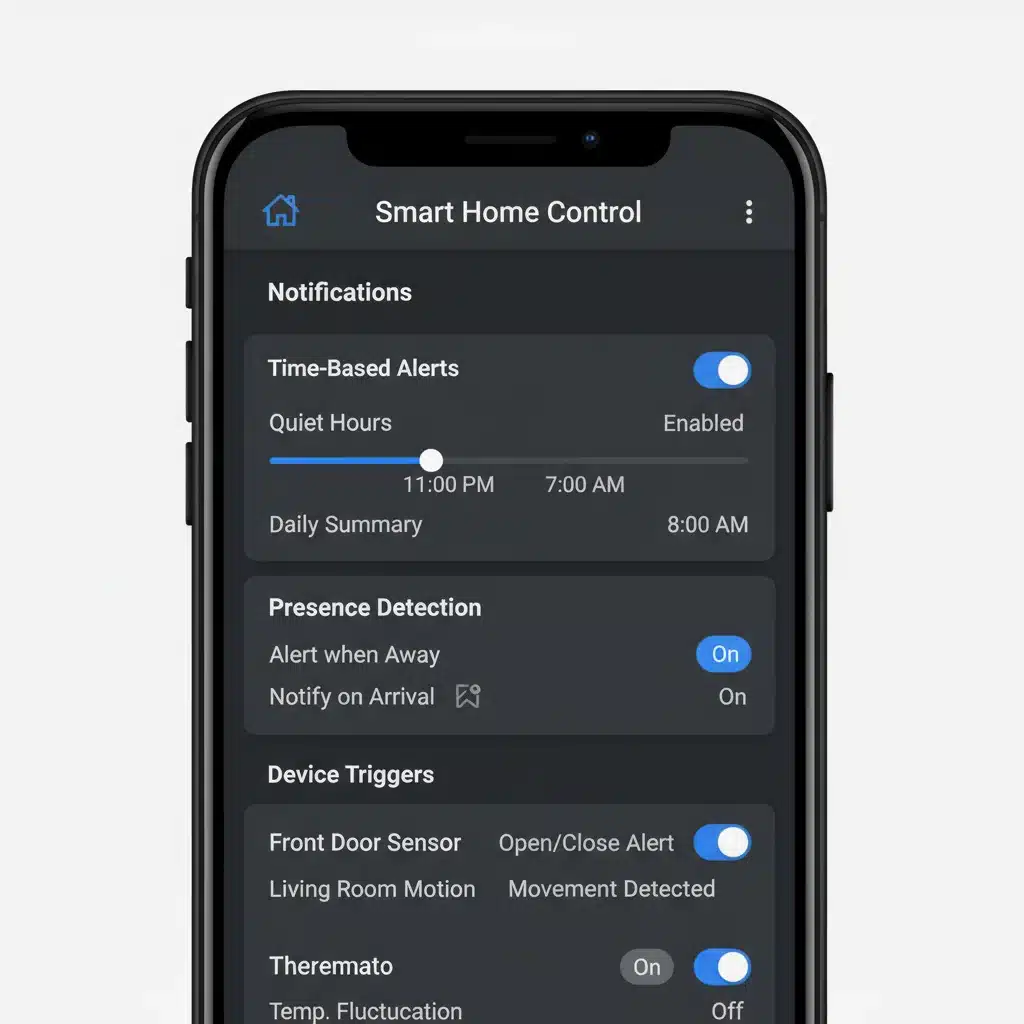
One of the most powerful yet underutilized features in managing smart home notifications is the implementation of time-based and contextual rules. Most smart home platforms (like Apple HomeKit, Google Home, Amazon Alexa, or dedicated manufacturer apps) offer robust automation capabilities that extend far beyond simple scheduling. This advanced setting allows your home to understand when certain alerts are relevant and when they are merely noise.
Leveraging Time-Based Automation
Think about your daily routine. Do you really need to know that your front door opened at 3 AM if everyone is asleep and no one is expected? Or do you need a motion alert from your living room camera when you’re actively watching TV? Probably not. Time-based rules allow you to define specific windows during which certain notifications are active or suppressed.
- Example 1: Security Camera Alerts: Instead of receiving motion alerts 24/7, configure your outdoor security cameras to only send notifications during specific hours, such as when you are typically away from home (e.g., 9 AM to 5 PM on weekdays) or after everyone is asleep (e.g., 11 PM to 6 AM). During other times, the camera can still record, but you won’t be constantly pestered by alerts from a delivery driver or a pet.
- Example 2: Smart Lock Activity: If you have a smart lock, you might want to be notified every time it’s unlocked during the day, but perhaps only if it’s unlocked by an unrecognized code or at an unusual time during the night. You can set rules to suppress notifications for known user codes during specific hours.
- Example 3: Appliance Monitoring: A smart washing machine might send a notification when a cycle finishes. While useful during the day, you might not want this alert at 1 AM. Configure it to only send alerts between certain daytime hours.
To implement this, you’ll typically navigate to the ‘Automations,’ ‘Routines,’ or ‘Scenes’ section within your smart home app. Look for options that allow you to add conditions based on ‘Time of Day,’ ‘Day of the Week,’ or even ‘Sunrise/Sunset.’ This level of detail ensures your smart home notifications are contextually aware of your schedule.
Incorporating Contextual Data: Presence Detection
Beyond time, the presence of occupants is a critical piece of contextual data. Why receive an alert that your garage door opened if you’re the one opening it? Presence detection, often facilitated by geofencing (your phone’s location), Wi-Fi connectivity, or even motion sensors, can dramatically reduce irrelevant alerts.
- Example 1: Geofencing for Security: Configure your security system to only send motion alerts from indoor cameras when ‘no one is home.’ Your smart home app can detect when all registered family members’ phones leave a defined geofence around your house. When the last person leaves, the system arms and activates full notifications. When the first person returns, it disarms and silences indoor motion alerts.
- Example 2: Door/Window Sensor Alerts: If you have contact sensors on doors and windows, you might want alerts if they open when you’re away. However, if you’re home, these alerts are likely unnecessary. Set rules to only notify you if these sensors are triggered when your smart home system detects you are not present.
- Example 3: Smart Thermostat Reminders: Some smart thermostats send reminders to change filters or adjust settings. These can be suppressed if you’re on vacation, only to reappear when you’re detected to be home again.
Combining time-based rules with presence detection creates a robust and intelligent notification system. For example, ‘Only send outdoor camera motion alerts between 11 PM and 6 AM, BUT only if no one is home.’ This multi-layered approach ensures that your smart home notifications are not just timely, but also relevant to who is home and what they are doing. This sophisticated filtering is a cornerstone of reducing notification noise by 25% or more.
Advanced Setting 2: Granular Device-Specific Notification Tiers
Many users treat all smart home notifications with equal weight, either enabling them all or disabling them entirely. This binary approach misses the nuanced control available in most modern smart home ecosystems. The second advanced setting involves creating granular, device-specific notification tiers, allowing you to prioritize alerts based on their urgency and your personal preferences.
Categorizing Alert Importance
Not all alerts are created equal. An alert about a potential water leak is far more critical than an alert that your smart plug turned on. By categorizing your devices and their potential alerts, you can assign different notification behaviors.
- Critical Alerts (Immediate Action Required): These are alerts that demand your immediate attention, such as smoke detector alarms, carbon monoxide warnings, major water leaks, or unauthorized entry detections. These should bypass ‘Do Not Disturb’ modes and potentially trigger louder, more persistent sounds.
- Important Alerts (Timely Information, Not Urgent): These provide valuable information that you should be aware of, but don’t necessarily require immediate action. Examples include a package delivery notification, a garage door left open for an extended period, or a child arriving home from school. These can be standard push notifications.
- Informational Alerts (Background Awareness): These are for general awareness and typically don’t require any action. Examples include a smart appliance completing a cycle, a light turning on/off as part of an automation, or a daily summary of energy usage. These might be best suited for ‘silent’ notifications, email summaries, or log entries within the app, rather than constant phone pings.
Implementing Tiered Notifications
To implement this, you’ll need to dive into the individual settings for each smart device within its respective app or your overarching smart home hub. Look for options like:
- Notification Styles/Priorities: Many operating systems (iOS, Android) and smart home apps allow you to set different notification styles: banners, lock screen alerts, sound, vibration, or silent. Assign ‘Critical’ alerts to be persistent and audible, ‘Important’ alerts to be banners with sound, and ‘Informational’ alerts to be silent banners or appear only in the notification shade without sound.
- Specific Event Triggers: Instead of getting a generic ‘motion detected’ alert from a security camera, see if you can refine it. For instance, some cameras can differentiate between ‘person detected,’ ‘vehicle detected,’ or ‘animal detected.’ You might only want a critical alert for ‘person detected’ during specific hours, and a silent log entry for ‘animal detected.’
- Grouped Notifications: If your system supports it, group similar informational alerts together. Instead of 10 separate notifications for lights turning on throughout the house, receive one summary notification ‘Lights turned on in 3 rooms.’
- Digest/Summary Notifications: For purely informational updates, check if your apps offer daily or weekly digest emails or in-app summaries instead of real-time alerts. This keeps you informed without constant interruptions.
By meticulously configuring these tiered settings for each device, you gain unparalleled control over your smart home notifications. This approach ensures that your smart home communicates with you effectively, highlighting what truly matters and reducing the background noise. This is a significant step towards achieving our 25% reduction target for unnecessary alerts.
Advanced Setting 3: Inter-Device Communication and Conditional Logic
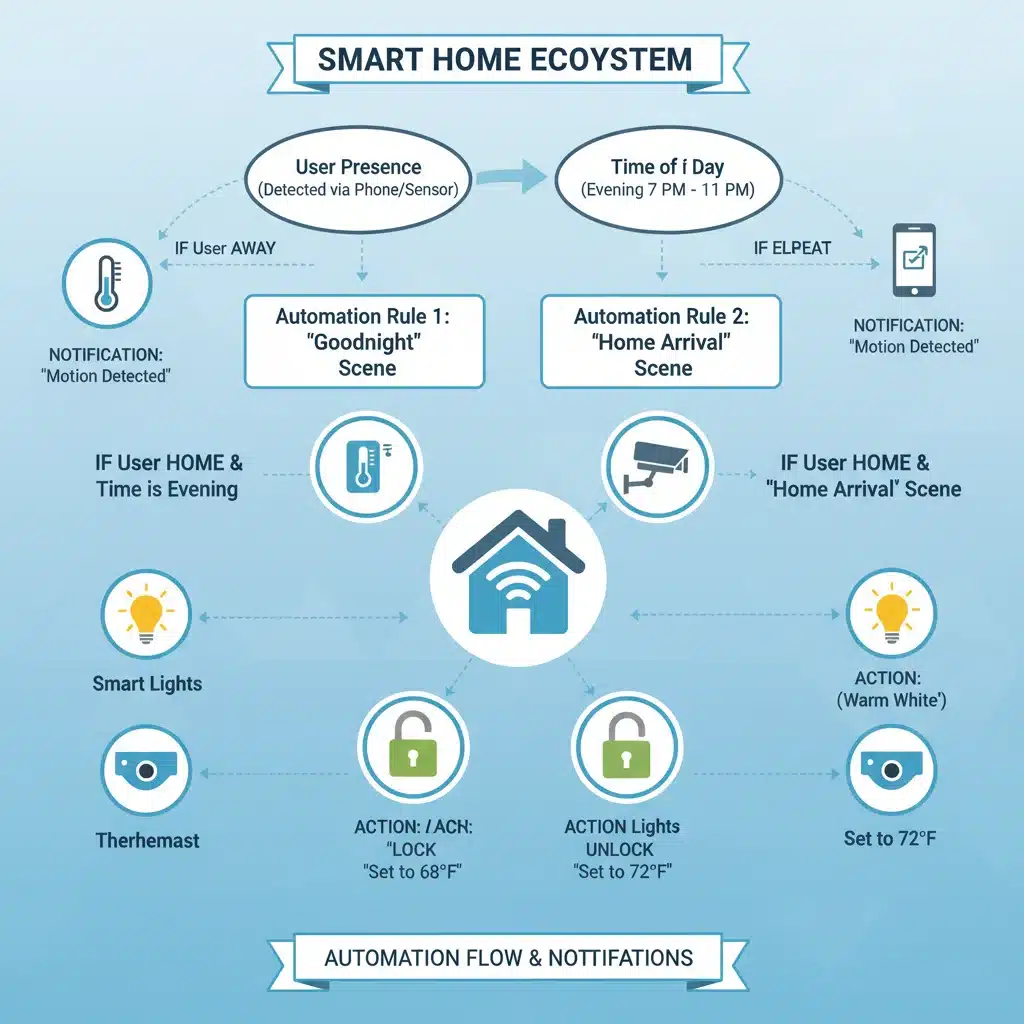
The third advanced setting takes notification management to the next level by leveraging the interconnectedness of your smart home devices. Instead of each device acting in isolation, inter-device communication and conditional logic allow devices to ‘talk’ to each other, creating more intelligent and context-aware notification triggers. This is often achieved through ‘If This, Then That’ (IFTTT) rules, custom automations, or scripting within advanced smart home hubs.
Creating Intelligent Automation Chains
The core idea here is to prevent alerts when another device or state in your home implicitly or explicitly makes the alert redundant. This moves beyond simple time or presence triggers and delves into the logical relationships between events.
- Example 1: Motion Sensor + Light State: You have a motion sensor in your hallway and a smart light. If the motion sensor detects motion, and the light is already on, you likely don’t need a notification. Configure the rule: ‘IF motion detected in hallway AND light is OFF, THEN send notification.’ This prevents alerts when someone is simply walking through an already lit area.
- Example 2: Door Sensor + Smart Lock: A common frustration is getting ‘door opened’ alerts when you’ve just unlocked and opened the door yourself. Set a rule: ‘IF smart lock is unlocked AND door sensor detects open within 30 seconds, THEN DO NOT send door open notification.’ Only send the notification if the door opens without being unlocked first, or if it remains open for too long.
- Example 3: Security Camera + Alarm Status: Your outdoor camera detects motion. If your security system is armed, you might want a critical alert. If the system is disarmed, you might only want a silent log entry or no notification at all, especially if it’s daytime and people are typically moving around. The condition here is the ‘state’ of your alarm system.
- Example 4: Smoke Detector + HVAC: While not directly a notification suppression, this is an excellent example of inter-device communication. If a smoke detector triggers, your smart home could automatically turn off your HVAC system to prevent smoke circulation and then send a critical alert. The ‘turn off HVAC’ action is a direct result of the smoke detector’s state.
Leveraging Advanced Hub Features and IFTTT
To implement these complex conditional rules, you’ll typically need to use the more advanced features of your smart home hub or a service like IFTTT:
- Smart Home Hubs (e.g., SmartThings, Hubitat, Home Assistant): These platforms excel at creating intricate rules based on multiple conditions (AND/OR logic). You can build elaborate automations that say, ‘IF (motion detected AND time is between X and Y) OR (door opened AND security system is armed), THEN send notification.’
- IFTTT (If This, Then That): IFTTT acts as a bridge between different smart home ecosystems and services. You can create ‘applets’ that link triggers from one service to actions in another. For example, ‘IF my Nest camera detects a person, THEN send a push notification to my phone ONLY IF my Philips Hue lights are off.’ This helps create conditions that might not be natively supported by a single brand’s app.
- Scripting/YAML (for advanced users): Platforms like Home Assistant offer even deeper customization through scripting languages (like YAML). This allows for highly specific and complex conditional logic, giving you ultimate control over every aspect of your smart home notifications.
By effectively utilizing inter-device communication and conditional logic, you move beyond reactive alerts to proactive, intelligent communication from your smart home. This minimizes false positives and ensures that when a notification does arrive, it carries genuine significance. This is perhaps the most impactful strategy for achieving our goal of a 25% reduction in unnecessary smart home alerts by 2026, leading to a truly harmonious smart living experience.
Practical Implementation Steps and Best Practices
Now that we’ve explored the three advanced settings, let’s discuss how to put them into practice and some best practices to ensure your success in reducing smart home notifications.
Step-by-Step Implementation Guide:
- Audit Your Current Notifications: For one week, pay close attention to every smart home notification you receive. Categorize them (Critical, Important, Informational) and note which ones felt unnecessary or ill-timed. This audit will be your baseline.
- Identify Your Smart Home Hub: Determine which app or hub is your primary control center (e.g., Google Home, Amazon Alexa, Apple Home, SmartThings, individual device apps). Most advanced settings will be configured there.
- Start with Time-Based Rules (Setting 1): Begin by implementing time-based rules for your most chatty devices (e.g., security cameras, door sensors). Define ‘away’ and ‘sleep’ hours where certain alerts can be suppressed or changed to silent.
- Integrate Presence Detection (Setting 1): If your hub supports geofencing, set up ‘Home’ and ‘Away’ modes. Link these modes to your notification profiles so that indoor motion alerts, for example, are only active when you’re away.
- Configure Granular Tiers (Setting 2): Go device by device. For each smart device, access its notification settings. Assign different notification styles (sound, vibration, silent) based on the alert’s importance. Refine event triggers (e.g., ‘person detected’ vs. ‘any motion’).
- Explore Inter-Device Logic (Setting 3): Identify scenarios where one device’s state makes another device’s alert redundant. Use your hub’s automation builder or IFTTT to create conditional rules (e.g., ‘IF door opens AND smart lock was just unlocked by me, THEN suppress door open notification’).
- Test and Refine: After implementing changes, monitor your notifications closely. Did you miss anything important? Did you still get unnecessary alerts? Adjust your rules as needed. This is an iterative process.
Best Practices for Notification Management:
- Be Patient: Achieving the perfect balance takes time and experimentation. Don’t get discouraged if your initial attempts aren’t perfect.
- Prioritize Critical Alerts: Always ensure that truly critical alerts (smoke, CO, water leaks, unauthorized entry) can bypass all suppression rules and always reach you with maximum urgency.
- Use ‘Do Not Disturb’ Wisely: While your phone’s ‘Do Not Disturb’ can silence all notifications, granular smart home settings allow for more intelligent filtering, letting critical alerts through even when you’re focusing.
- Regular Review: Your routines and needs change. Periodically review your smart home notifications settings to ensure they still align with your lifestyle.
- Leverage Voice Assistants: Sometimes, a voice announcement from your smart speaker (‘Motion detected in the backyard’) is less intrusive than a phone notification, especially for informational alerts. Explore these options.
- Educate Household Members: If multiple people interact with the smart home, ensure everyone understands the notification logic to avoid confusion or accidental overrides.
- Backup Your Settings: If your smart home platform allows it, back up your automation rules and notification settings. This can save you a lot of time if you ever need to reset devices or migrate to new hardware.
By diligently following these steps and best practices, you’ll not only achieve our goal of reducing unnecessary smart home notifications by 25% by 2026 but also gain a deeper understanding and control over your entire smart home ecosystem. This leads to a more peaceful, efficient, and genuinely smart living experience.
The Future of Smart Home Notifications: AI and Predictive Intelligence
As we look towards 2026 and beyond, the evolution of smart home notifications will undoubtedly be shaped by advancements in Artificial Intelligence (AI) and predictive intelligence. While the advanced settings we’ve discussed offer significant control, future systems promise an even more intuitive and autonomous approach to alert management.
Imagine a smart home that doesn’t just follow rules you’ve set, but actively learns from your behavior, preferences, and the context of your environment. AI-powered notification systems could:
- Learn Your Habits: An AI could observe when you typically leave and return, when you sleep, and when you’re busy, automatically adjusting notification priorities without manual configuration. It would learn that a door opening at 8 AM on a weekday is normal, but at 2 AM is an anomaly.
- Predict Importance: Based on historical data and real-time sensor input, an AI could predict the likelihood of an alert being critical. For example, if a motion sensor is triggered immediately after a window sensor, the AI might elevate the alert’s priority.
- Contextualize with External Data: Future systems could integrate with external data sources like weather forecasts, local traffic, or even public event schedules. A motion alert during a severe storm might be treated differently than one on a sunny day.
- Natural Language Processing (NLP): Instead of navigating complex menus, users might simply tell their smart assistant, ‘Only notify me about my security camera if I’m not home and it sees a person,’ and the system would interpret and configure the rules.
- Adaptive Notification Channels: AI could dynamically choose the best notification channel (push, email, voice, smart display) based on your current activity and location. If you’re driving, it might prioritize a voice alert; if you’re working, a silent banner.
- Personalized Sensitivity: Different household members might have different notification sensitivities. An AI could tailor alerts individually, ensuring each person receives information relevant to them without bothering others.
While some of these capabilities are nascent or require highly integrated ecosystems, the trend is clear: smart home notifications will become increasingly intelligent, moving from rule-based to learning-based. This future promises a smart home that anticipates your needs and communicates only when truly beneficial, further reducing notification fatigue and enhancing the overall smart living experience. By mastering the advanced settings available today, you’re not just reducing alerts; you’re preparing for an even smarter, less intrusive future.
Conclusion: Reclaiming Your Peace of Mind with Smarter Smart Home Notifications
The promise of a smart home is one of convenience, safety, and efficiency. However, for many, this promise has been overshadowed by a deluge of constant smart home notifications. We’ve seen how this ‘always-on’ communication can lead to fatigue, stress, and a diminished appreciation for the very technology designed to simplify our lives.
This guide has equipped you with three advanced strategies to reclaim control and transform your smart home’s communication style:
- Time-Based and Contextual Notification Rules: Teaching your smart home when an alert is relevant based on your schedule and presence.
- Granular Device-Specific Notification Tiers: Prioritizing alerts by urgency and customizing their delivery method for each device.
- Inter-Device Communication and Conditional Logic: Building intelligent automation chains where devices ‘talk’ to each other to suppress redundant alerts.
By diligently implementing these advanced settings, you are not just tweaking a few toggles; you are fundamentally rethinking how your smart home interacts with you. Our ambitious goal of reducing unnecessary alerts by 25% by 2026 is entirely achievable through this strategic and thoughtful approach. The result will be a smart home that truly serves you – one that provides critical information precisely when needed, without overwhelming you with noise.
Embrace these powerful customization options. Take the time to audit, configure, test, and refine your notification preferences. The peace of mind, reduced digital fatigue, and enhanced appreciation for your smart home technology will be well worth the effort. Step into a future where your smart home is a truly intuitive and unobtrusive companion, whispering only what’s essential, and letting you enjoy the tranquility of a truly connected, yet calm, living space.