AI Home Surveillance: 10 Steps to Advanced Safety in 2026

In an increasingly interconnected world, the concept of home security has evolved dramatically. Gone are the days when a simple lock and key sufficed. Today, we stand on the cusp of a new era, one where artificial intelligence (AI) is transforming how we protect our most valuable assets and, more importantly, our loved ones. Implementing AI home surveillance is no longer a luxury but a strategic move towards a safer, more intelligent living environment. This comprehensive 10-step guide is designed to equip you with the practical solutions and insider knowledge needed to embrace AI-powered surveillance in your home by 2026, ensuring enhanced safety and unparalleled peace of mind.
The rise of AI in security systems brings with it a host of advanced capabilities that traditional systems simply cannot match. From sophisticated facial recognition and anomaly detection to predictive analytics and automated responses, AI is revolutionizing the way we perceive and manage home safety. This guide will walk you through every critical aspect, from initial planning and hardware selection to advanced setup, privacy considerations, and ongoing maintenance. Whether you’re a tech enthusiast eager to adopt the latest innovations or a homeowner seeking robust protection, understanding and implementing AI home surveillance is paramount. Let’s delve into the future of home security, step by step.
Step 1: Assessing Your Home’s Security Needs and Vulnerabilities
Before diving into the exciting world of AI-powered gadgets, the foundational step for implementing AI home surveillance is a thorough assessment of your current home security landscape. This involves identifying potential vulnerabilities, understanding your property’s unique layout, and determining what you aim to protect. Begin by walking around your property, both inside and out, with a critical eye. Where are the entry points? Are there secluded areas that could offer cover to intruders? What are your most valuable possessions, and where are they located?
Identifying Key Areas for Surveillance
- Entry Points: Doors (front, back, side, garage), windows (ground floor, easily accessible upper floors), skylights.
- High-Value Areas: Rooms containing expensive electronics, jewelry, important documents, or safes.
- Perimeter: Fences, gates, gardens, and pathways leading to your home.
- Blind Spots: Areas not currently covered by existing lighting or security measures.
Understanding Your Lifestyle and Specific Concerns
Your daily routine and specific concerns play a significant role in designing an effective AI home surveillance system. Do you travel frequently? Do you have pets or children who need monitoring? Are there specific threats in your neighborhood, such as package theft or vandalism? Answering these questions will help tailor your system to your unique requirements. For instance, if package theft is a concern, a camera with advanced object recognition and two-way audio at your front door would be a priority. If you have children, AI-powered motion detection that differentiates between a child and an intruder is invaluable.
Budgeting for Your AI Home Surveillance System
While AI technology can seem expensive, there’s a wide range of solutions available to fit various budgets. Establish a realistic budget early on, considering not just the initial hardware cost but also potential subscription fees for cloud storage, advanced AI features, and professional monitoring services. Remember, investing in AI home surveillance is an investment in peace of mind and long-term security. Prioritize critical areas first and then expand your system as your budget allows.
Step 2: Researching AI Surveillance Technologies and Features
Once you’ve assessed your needs, the next step is to explore the vast array of AI surveillance technologies available. The market for AI home surveillance is rapidly expanding, with new features and devices emerging constantly. Understanding what’s available will empower you to make informed decisions.
Key AI Features to Look For:
- Facial Recognition: Identifies known individuals (family, friends) and alerts you to unknown faces. This is a cornerstone of advanced AI home surveillance.
- Object Detection and Classification: Distinguishes between humans, animals, vehicles, and inanimate objects, reducing false alarms.
- Anomaly Detection: Learns normal patterns of activity and flags anything unusual, such as a car lingering too long or a person attempting to open a window.
- Activity Zones and Person/Pet Detection: Allows you to define specific areas for monitoring and receive alerts only when a person or pet enters these zones.
- Two-Way Audio: Enables communication with visitors or deterring intruders remotely.
- Night Vision: Essential for 24/7 monitoring, with options for infrared or color night vision.
- Cloud vs. Local Storage: Understand the pros and cons of storing footage remotely (cloud) versus on-device (local SD card or NVR).
- Integration Capabilities: How well does the system integrate with other smart home devices (smart locks, lighting, alarms)?
Understanding Different Camera Types
- Wired Cameras: Offer reliable power and data connection, often preferred for critical areas.
- Wireless Cameras: Provide flexibility in placement, but require battery management and a strong Wi-Fi signal.
- Dome Cameras: Discreet and vandal-resistant, suitable for indoor and outdoor use.
- Bullet Cameras: More visible, acting as a deterrent, often used for outdoor perimeter surveillance.
- PTZ (Pan-Tilt-Zoom) Cameras: Offer remote control over camera movement, ideal for covering large areas.
As you research, consider reputable brands known for their security and privacy standards. Look for reviews and comparisons to understand real-world performance and user satisfaction with their AI home surveillance offerings.
Step 3: Selecting Compatible Hardware and Software
With your research complete, it’s time to choose the specific hardware and software that will form the backbone of your AI home surveillance system. Compatibility is key here; ensure all components can communicate seamlessly.
Choosing AI-Powered Cameras
Based on your assessment in Step 1 and research in Step 2, select cameras that offer the AI features you need in the locations you’ve identified. For example, a front door camera should have excellent facial recognition and two-way audio, while a backyard camera might prioritize wide-angle views and robust motion detection. Consider video resolution (1080p is a good baseline, 4K offers superior detail), field of view, and weather resistance for outdoor units.
Central Hub or NVR (Network Video Recorder)
Many AI home surveillance systems operate with a central hub that processes AI algorithms and manages recordings. Alternatively, an NVR can store footage locally from multiple IP cameras. Decide which setup best suits your needs for storage, processing power, and integration with other smart home devices. Some systems are entirely cloud-based, requiring no local hub.
Software and Mobile Applications
The accompanying software and mobile app are crucial for managing your AI home surveillance system. Look for intuitive interfaces, easy access to live feeds, customizable alert settings, and efficient playback of recorded events. Ensure the app is regularly updated and offers strong security protocols for remote access.
Essential Accessories
Don’t forget accessories like secure mounting brackets, weatherproof enclosures (if not built-in), extra storage (SD cards or hard drives), and reliable power sources. For wireless cameras, consider the battery life and ease of recharging or replacement.
Step 4: Planning Your Network Infrastructure for Optimal Performance
A robust and reliable network is the unsung hero of any effective AI home surveillance system. Without proper network infrastructure, even the most advanced AI cameras will underperform. This step focuses on ensuring your home network can handle the demands of continuous video streaming and AI processing.
High-Speed Internet Connection
AI home surveillance systems, especially those relying on cloud storage and remote access, require a stable and fast internet connection. Upload speed is particularly important for sending video footage to the cloud. Consult your internet service provider (ISP) to ensure your plan can support multiple high-definition camera feeds simultaneously without lag or interruptions.
Reliable Wi-Fi Coverage
For wireless cameras, strong Wi-Fi coverage throughout your property is non-negotiable. Consider upgrading to a mesh Wi-Fi system if you have a large home or areas with weak signals. Place your router centrally and minimize obstructions. Ethernet backhaul for mesh systems can significantly improve performance for high-bandwidth devices.
Network Security
Your AI home surveillance system is only as secure as your network. Implement strong Wi-Fi passwords, enable WPA3 encryption if available, and regularly update your router’s firmware. Consider setting up a separate guest network for other devices to isolate your security system on its own network segment, enhancing security.
Power Over Ethernet (PoE) for Wired Cameras
If you opt for wired cameras, Power over Ethernet (PoE) is an excellent solution. PoE cables provide both power and data connectivity, simplifying installation and reducing cable clutter. Ensure your network switch or NVR supports PoE if you plan to use this technology.
Step 5: Strategic Placement and Installation of Cameras
The effectiveness of your AI home surveillance system hinges significantly on the strategic placement and proper installation of your cameras. This isn’t just about sticking a camera anywhere; it’s about optimizing its field of view, minimizing blind spots, and considering environmental factors.
Optimal Camera Placement
- Height: Mount cameras high enough to prevent tampering but low enough to capture clear facial features (typically 8-10 feet for outdoor cameras).
- Angle: Aim for a wide field of view that covers critical entry points and vulnerable areas. Avoid pointing cameras directly at bright light sources (sun, streetlights) that can cause glare.
- Corners: Placing cameras in corners often provides the widest possible view of a room or area.
- Deterrence: Visible cameras can act as a deterrent, but discreet placement might be preferred for covert monitoring in some areas.
Professional vs. DIY Installation
While many AI home surveillance systems are designed for DIY installation, consider professional help for complex setups involving wiring, drilling through walls, or integrating with existing home automation systems. Professionals can ensure optimal placement, secure mounting, and proper configuration.
Weatherproofing and Tamper-Proofing
For outdoor cameras, ensure they are rated for the local climate (IP rating for water and dust resistance). Securely mount cameras to prevent easy removal or repositioning by intruders. Conceal wiring where possible to prevent cutting.
Step 6: Configuring AI Features and Alert Settings
This is where the ‘AI’ in AI home surveillance truly shines. Proper configuration of AI features and alert settings is crucial to maximize effectiveness and minimize false alarms. An improperly configured system can become a source of frustration rather than security.
Customizing Activity Zones
Define specific areas within the camera’s view where you want to detect motion or activity. For instance, you might set an activity zone around your driveway to detect vehicles but exclude a busy sidewalk to avoid constant alerts from passersby. This is fundamental for efficient AI home surveillance.
Setting Up Person, Vehicle, and Pet Detection
Leverage AI’s ability to differentiate between objects. Configure your system to alert you only when a person or vehicle is detected, ignoring swaying trees or small animals. This significantly reduces irrelevant notifications.
Facial Recognition Training
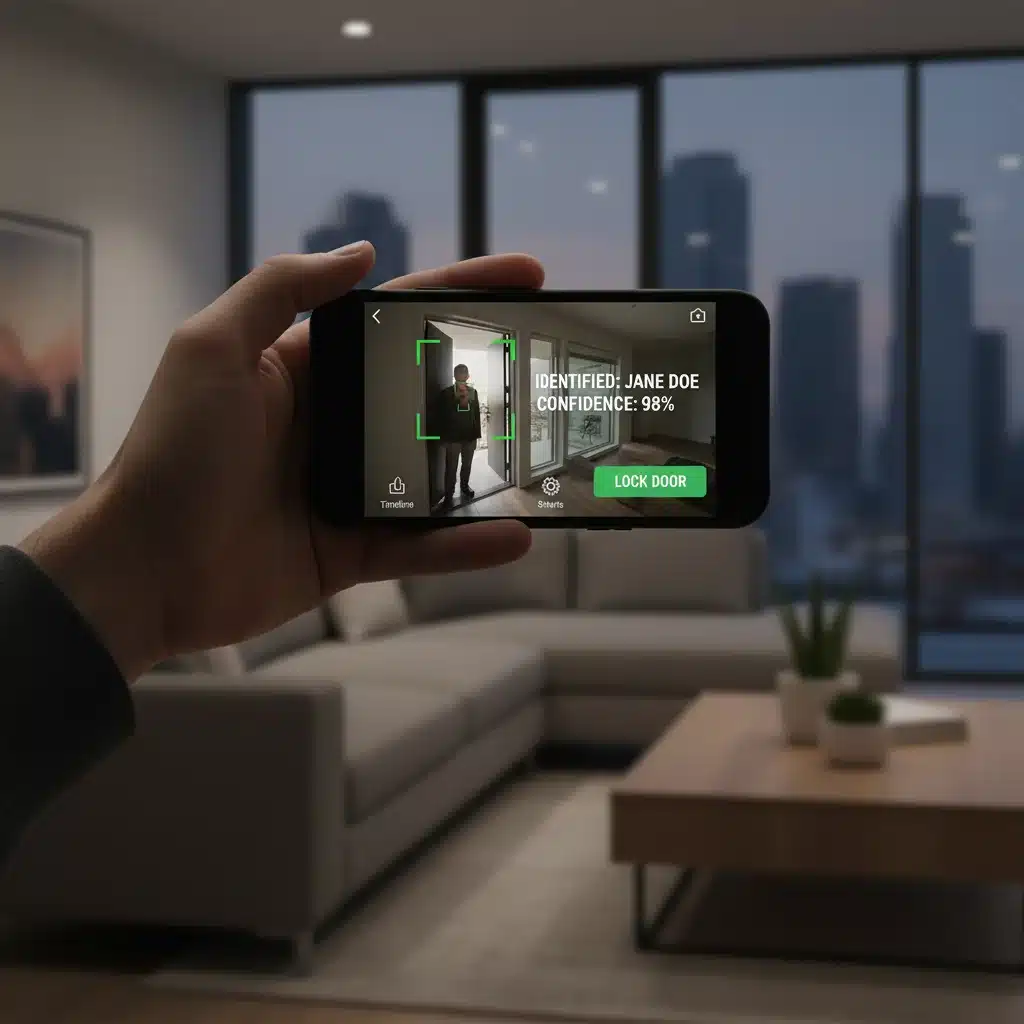
If your system supports facial recognition, you’ll need to train it to recognize family members and frequent visitors. Upload clear images of authorized individuals. The system will then be able to distinguish between familiar faces and potential intruders, sending targeted alerts for unknown individuals.
Optimizing Alert Preferences
Decide how you want to receive alerts (push notifications, email, SMS) and when. You might want immediate notifications for person detection during specific hours, but only a summary of pet activity. Configure sensitivity levels for motion detection to strike a balance between catching genuine threats and avoiding excessive alerts.
Step 7: Integrating with Your Smart Home Ecosystem
For a truly intelligent and seamless security experience, integrate your AI home surveillance system with your existing smart home ecosystem. This allows for automated responses and a unified control interface, making your home not just secure, but smarter.
Benefits of Integration
- Automated Lighting: If an AI camera detects an intruder, smart lights can automatically turn on, startling the person and improving camera visibility.
- Smart Locks: Integrate with smart locks to automatically lock doors when you leave or in response to an alert.
- Alarm Systems: Link your AI cameras to your main home alarm system for a comprehensive security solution.
- Voice Assistants: Control your cameras, view live feeds, and arm/disarm your system using voice commands via Google Assistant, Amazon Alexa, or Apple HomeKit.
Choosing Compatible Platforms
When selecting your AI home surveillance components, check for compatibility with popular smart home platforms like Apple HomeKit, Google Home, Amazon Alexa, or SmartThings. This ensures smooth integration and avoids isolated systems.
Creating Automation Routines
Use your smart home app to create custom automation routines. For example, ‘If AI camera detects person at front door after 10 PM, turn on porch light and send notification.’ This proactive approach significantly enhances your home’s security posture.
Step 8: Ensuring Data Privacy and Cybersecurity
As you embrace the power of AI home surveillance, it’s paramount to address data privacy and cybersecurity. Your security system collects sensitive information, and protecting it from unauthorized access is as crucial as protecting your physical home.
Strong Passwords and Two-Factor Authentication (2FA)
Use unique, strong passwords for all your security devices and accounts. Enable two-factor authentication (2FA) wherever possible. This adds an extra layer of security, making it much harder for unauthorized individuals to gain access.
Encrypting Data Transmission
Ensure your AI home surveillance system uses encryption for both local and cloud data transmission. This protects your video feeds and personal data from being intercepted by malicious actors.
Regular Software and Firmware Updates
Manufacturers frequently release software and firmware updates to patch security vulnerabilities and introduce new features. Make it a habit to regularly update all your security devices and their accompanying apps. This is a critical, yet often overlooked, aspect of cybersecurity.
Understanding Cloud Storage and Privacy Policies
If you use cloud storage, carefully read the provider’s privacy policy. Understand how your data is stored, who has access to it, and for how long. Choose providers with a strong reputation for data security and privacy.
Physical Security of Devices
Ensure your NVR or central hub is stored in a secure, inconspicuous location to prevent physical tampering or theft.

Step 9: Testing, Monitoring, and Regular Maintenance
Implementing AI home surveillance is not a one-time setup; it requires ongoing testing, active monitoring, and regular maintenance to ensure its continued effectiveness.
Thorough System Testing
After installation and configuration, rigorously test every component of your system. Trigger motion sensors, walk through activity zones, and test facial recognition with known and unknown faces. Verify that alerts are received promptly and that recordings are clear and accessible. Test two-way audio and night vision features.
Active Monitoring and Alert Response
Familiarize yourself with the monitoring interface and practice responding to different types of alerts. Understand how to quickly view live feeds, access recorded footage, and communicate with emergency services if necessary. If you have a professional monitoring service, understand their protocols.
Routine Maintenance Checks
- Clean Lenses: Regularly clean camera lenses to ensure clear image quality. Dust, dirt, and cobwebs can impair performance.
- Check Power Supplies: Ensure all wired cameras have a stable power connection and wireless camera batteries are charged or replaced as needed.
- Verify Network Connectivity: Periodically check that all devices are connected to the network and operating correctly.
- Review Recordings: Occasionally review recorded footage to ensure the system is capturing what it should and to identify any potential blind spots or areas for improvement.
Step 10: Staying Informed and Upgrading Your System
The world of AI and smart home technology is constantly evolving. The final, ongoing step in implementing AI home surveillance is to stay informed about new developments and consider upgrading your system as technology advances.
Keeping Up with AI Innovations
Follow tech news, security blogs, and manufacturer announcements to stay updated on the latest AI features, security enhancements, and new hardware. AI algorithms are continually improving, offering more accurate detection and smarter insights.
Considering System Upgrades
As your needs change or new, more effective technologies become available, be prepared to upgrade components of your system. This might involve replacing older cameras with higher-resolution, more AI-capable models, or upgrading your central hub for faster processing. For instance, by 2026, expect even more sophisticated predictive analytics and deeper integration with broader city-wide smart infrastructure.
Adapting to Evolving Security Threats
Security threats also evolve. Staying informed about common home invasion tactics, cyber threats, and privacy concerns will help you adapt your AI home surveillance strategy accordingly. Your security system should be a dynamic, evolving shield, not a static defense.
Conclusion: Embracing the Future of Home Safety with AI
Implementing AI home surveillance is a significant step towards a more secure and intelligent living environment. By following these 10 comprehensive steps, from initial assessment and research to strategic installation, robust configuration, and ongoing maintenance, you can build a cutting-edge security system that offers unparalleled protection and peace of mind. The year 2026 promises even greater advancements in AI technology, making now the perfect time to embrace these innovations.
Remember, a truly secure home is one where technology works seamlessly in the background, providing proactive protection without constant intervention. With AI-powered surveillance, you’re not just installing cameras; you’re deploying an intelligent guardian that learns, adapts, and responds to threats, ensuring your home remains a safe sanctuary for years to come. Invest in your safety, empower your home with AI, and enjoy the confidence that comes with advanced, intelligent security.