Creating a Robust Smart Home Backup Plan: Ensure Continuous Operation During Power Outages
In an increasingly interconnected world, smart homes have become the norm, offering unparalleled convenience, security, and energy efficiency. From automated lighting and climate control to advanced security systems and smart appliances, these technologies seamlessly integrate into our daily lives. However, what happens when the power goes out? A sudden power outage can turn your sophisticated smart home into a collection of inert devices, disrupting everything from your morning routine to your home security. This is where a robust smart home backup plan becomes not just a luxury, but a necessity.
Imagine your smart thermostat failing to regulate temperature, your smart locks becoming unresponsive, or your security cameras going dark during a storm. The very systems designed to enhance your comfort and safety can become liabilities without a reliable backup. This comprehensive guide will walk you through the essential steps to create an effective smart home backup plan, ensuring your intelligent living space remains functional and secure, even when the grid goes down. We’ll explore various solutions, from immediate short-term fixes to long-term sustainable strategies, empowering you to maintain control over your smart environment no matter the circumstances.
Understanding the Vulnerabilities of Your Smart Home During an Outage
Before diving into solutions, it’s crucial to understand which aspects of your smart home are most vulnerable. Most smart devices rely heavily on a constant power supply and a stable internet connection. When these are interrupted, the device’s functionality can cease entirely or revert to a rudimentary, often less secure, state. Identifying critical devices and systems is the first step in formulating an effective smart home backup strategy.
Key Smart Home Components Affected by Power Outages:
- Smart Hubs and Routers: These are the brains of your smart home. Without power, your central hub and Wi-Fi router will shut down, rendering most, if not all, of your smart devices inoperable.
- Lighting: Smart bulbs and switches become useless without electricity, leaving you in the dark.
- Security Systems: Smart cameras, door/window sensors, and smart locks often lose power, compromising your home’s security. While some may have built-in battery backups, their duration is limited.
- Climate Control: Smart thermostats will cease to function, meaning your heating or air conditioning won’t work.
- Smart Appliances: Refrigerators, ovens, washing machines, and other smart appliances will simply stop.
- Internet Connectivity: Many smart devices rely on a constant internet connection for remote access and cloud-based features. Even if powered, they might lose full functionality without an active internet link.
Prioritizing these vulnerabilities will help you allocate resources effectively when building your smart home backup system. Think about what is absolutely essential for safety, comfort, and basic functionality during an outage. Is it your security system? Your internet connection for remote work? Or just basic lighting?
Phase 1: Immediate & Short-Term Backup Solutions
For brief power interruptions, immediate and short-term solutions are your first line of defense. These are typically easy to implement and relatively inexpensive, providing crucial minutes or hours of operation for your most critical devices.
Uninterruptible Power Supplies (UPS)
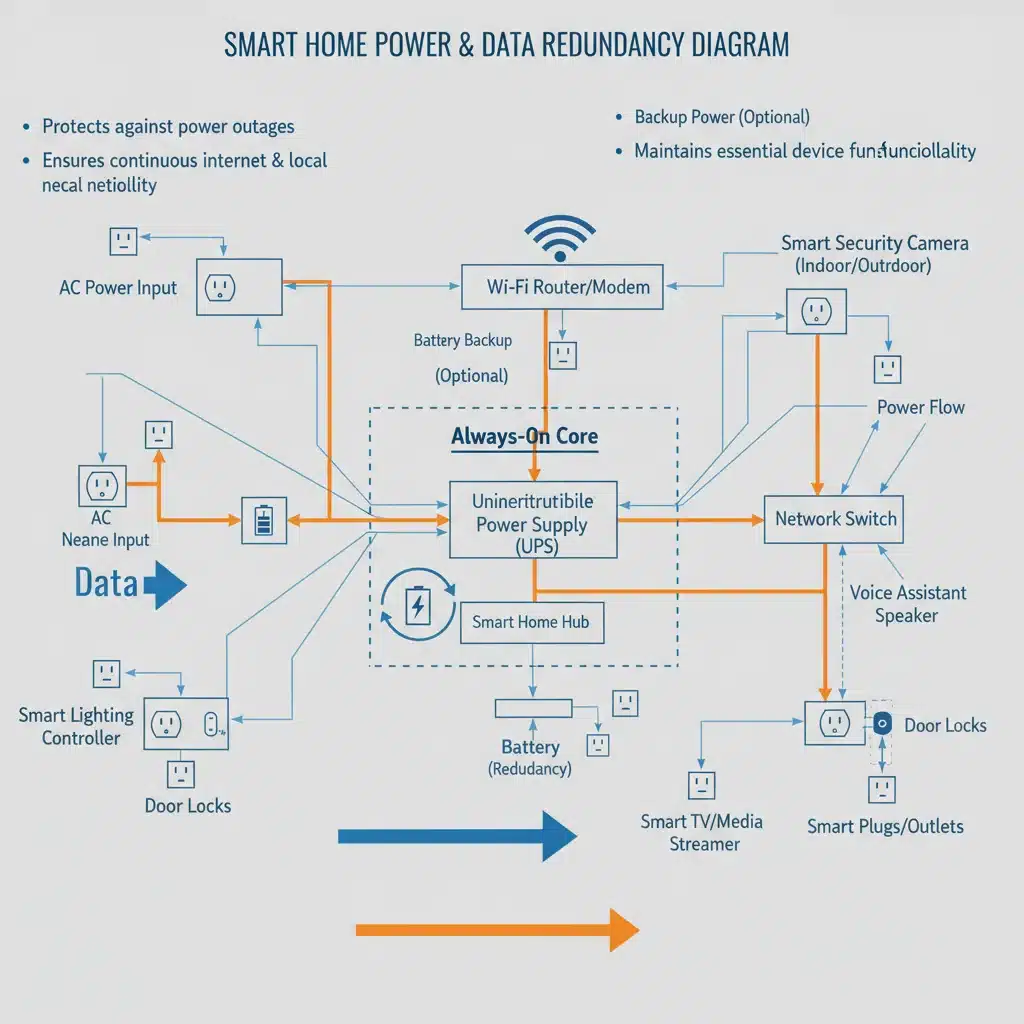
A UPS is essentially a large battery that provides power to connected devices when the main power source fails. It’s an excellent solution for sensitive electronics that require continuous power, even for a few minutes, to shut down properly or to bridge short outages. For a smart home backup, a UPS is ideal for your internet modem, Wi-Fi router, and smart home hub.
Benefits of a UPS:
- Instantaneous Switchover: There’s no delay when the power goes out; the UPS immediately takes over.
- Surge Protection: Most UPS units also offer surge protection, safeguarding your valuable electronics from power spikes.
- Sufficient Runtime: A standard UPS can power a router and smart hub for several hours, depending on the unit’s capacity, which is often enough for most common outages.
Choosing the Right UPS:
Consider the VA (Volt-Ampere) rating, which indicates the unit’s capacity. For a router and smart hub, a 600VA to 1000VA unit is usually sufficient. Look for models with multiple outlets and, if possible, a display that shows battery life and load. Placement is also key; keep it near your networking equipment.
Battery-Powered Smart Devices
Many smart devices now come with built-in battery backups or can operate on standard batteries. These are invaluable for maintaining functionality during an outage.
- Smart Locks: Most smart locks use standard AA or AAA batteries and can be opened manually with a key if the battery dies or power is lost. Ensure you regularly check and replace these batteries.
- Security Cameras: Some outdoor and indoor cameras include rechargeable batteries, offering a few hours to a few days of operation. Consider models that can integrate with solar panels for continuous charging.
- Doorbell Cameras: Similar to security cameras, many video doorbells have built-in batteries.
- Leak Detectors and Smoke/CO Detectors: These critical safety devices almost always have battery backups, but it’s essential to test them regularly.
While these devices offer individual resilience, remember that their smart features often rely on a working Wi-Fi network and smart hub, which is where a UPS for your core network equipment comes in.
Portable Power Stations (Power Banks)
For charging smaller devices like smartphones, tablets, and even powering low-wattage smart devices (like a single smart lamp or a fan), portable power stations are excellent. These large capacity battery packs can be recharged via wall outlets, car chargers, or even solar panels.
Advantages:
- Versatility: Can power a wide range of USB-powered devices and often include AC outlets for small appliances.
- Portability: Easy to move around the house or take with you.
- Scalability: Available in various capacities to suit different needs.
While not a whole-home solution, a few strategically placed portable power stations can keep essential communication and some smart functionalities alive during shorter outages, making them a valuable part of your smart home backup toolkit.
Phase 2: Medium to Long-Term Backup Solutions
For extended power outages, which can last for hours or even days, more robust solutions are required. These options involve a greater investment but offer comprehensive power continuity for your entire home or critical circuits.
Portable Generators
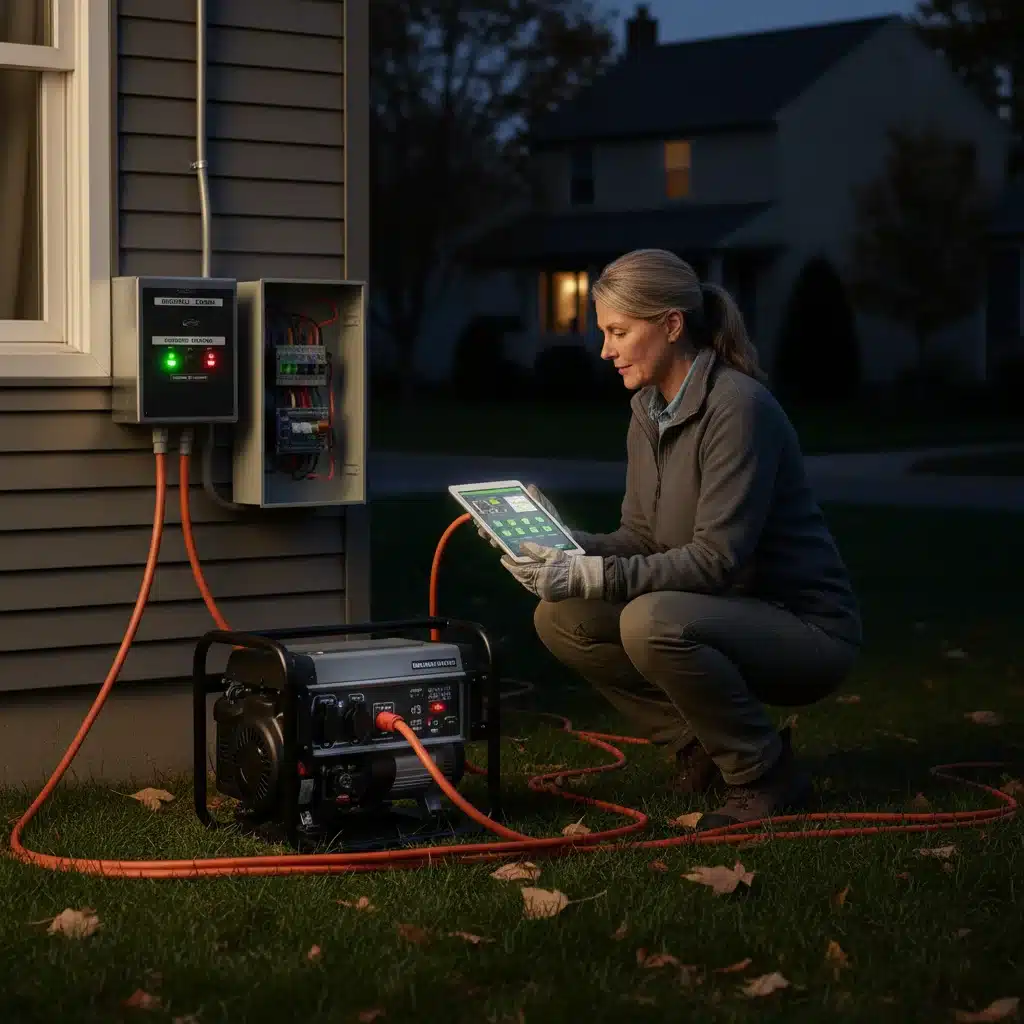
Portable generators are a popular choice for homeowners seeking a more substantial backup power source. They run on gasoline, propane, or natural gas and can power multiple appliances and circuits via extension cords or a manual transfer switch.
Considerations for Portable Generators:
- Fuel Type and Storage: Gasoline generators require careful fuel storage. Propane and natural gas options offer longer runtimes and easier fuel management if connected to a utility line.
- Wattage: Calculate the total wattage of the essential smart devices and other appliances you want to power. Remember to account for starting wattage (surge) for motors.
- Safety: Generators must always be operated outdoors in a well-ventilated area to prevent carbon monoxide poisoning. A manual transfer switch is highly recommended for safely connecting the generator to your home’s electrical panel.
- Noise: Portable generators can be noisy, which might be a concern for neighbors or during extended use.
Integrating a portable generator into your smart home backup plan means identifying which circuits power your smart hub, router, and other critical smart devices, and ensuring these are prioritized when the generator is connected.
Standby Generators (Whole-Home Generators)
For ultimate peace of mind and seamless power during extended outages, a standby generator is the gold standard. These units are permanently installed outside your home, typically run on natural gas or propane, and automatically turn on when a power outage is detected. They are connected directly to your home’s electrical system via an automatic transfer switch.
Advantages of Standby Generators:
- Automatic Operation: No manual intervention required.
- Whole-Home Power: Can power your entire home, including all smart devices, major appliances, and HVAC systems.
- Long Run Times: Can operate for days or even weeks, as long as fuel supply is maintained (especially with natural gas).
- Increased Home Value: A significant upgrade that adds value to your property.
While a significant investment, a standby generator ensures that your smart home backup is truly comprehensive, maintaining full functionality of all your smart devices and systems without interruption.
Home Battery Storage Systems (Solar + Battery)
With the rise of renewable energy, home battery storage systems, often coupled with solar panels, offer an eco-friendly and increasingly popular smart home backup solution. Systems like Tesla Powerwall, LG Chem RESU, or Enphase Encharge store excess solar energy or charge from the grid during off-peak hours, then supply power to your home when the grid is down.
Benefits of Battery Storage:
- Silent Operation: No noise compared to generators.
- Clean Energy: Reduces your carbon footprint.
- Energy Independence: Less reliance on the grid.
- Smart Energy Management: Many systems integrate with smart home platforms for optimized energy usage.
A well-designed solar-plus-battery system can keep your entire smart home running indefinitely during daylight hours and for extended periods overnight, making it an ideal long-term smart home backup strategy.
Phase 3: Network & Connectivity Backup
Even with power, many smart devices are useless without an internet connection. Your smart home backup plan must also address network redundancy.
Cellular Backup for Internet
Many internet service providers (ISPs) offer cellular backup options for your home internet. This involves a device that switches to a cellular network (like 4G or 5G) if your primary wired internet connection fails. This is crucial for maintaining cloud-dependent smart services, remote access to your smart home, and communication.
Key Considerations:
- Data Caps: Be aware of data limits, as cellular data can be expensive.
- Signal Strength: Ensure good cellular reception in your home.
- Compatibility: Check if your smart devices can operate on a cellular network (some local-only devices might not need it, but most cloud-connected ones will).
Local Control & Offline Functionality
Some smart home platforms and devices offer local control, meaning they can function without an active internet connection, as long as the local network (Wi-Fi) and the hub have power. This is a crucial feature for a resilient smart home backup.
- Zigbee/Z-Wave: Devices using these protocols often communicate directly with a local hub, which can continue to operate scenes and automations even without internet, provided the hub is powered (e.g., by a UPS).
- Matter/Thread: Newer standards like Matter are designed with local control in mind, enhancing offline reliability.
- Manual Overrides: Always ensure your smart devices have physical buttons or manual override options. For example, smart lights should still be able to be turned on/off with a traditional light switch, and smart locks should have a physical key.
When selecting new smart devices, prioritize those that offer robust local control capabilities to enhance your smart home backup strategy.
Developing Your Personalized Smart Home Backup Plan
Creating your plan involves several key steps:
-
Assess Your Needs and Prioritize Devices:
List all your smart devices. For each, ask:
- Is this device essential for safety (security, smoke detectors)?
- Is it essential for comfort (HVAC, critical lighting)?
- Is it essential for communication (internet, phone charging)?
- What is its power consumption?
- Does it have a built-in battery or manual override?
Categorize devices into ‘critical,’ ‘important,’ and ‘non-essential’ during an outage.
-
Calculate Power Requirements:
For your critical and important devices, determine their wattage. This will help you size UPS units, portable power stations, and generators correctly. Don’t forget the starting wattage for devices with motors.
-
Choose Your Backup Solutions:
Based on your assessment and budget, select a combination of short-term, medium-term, and long-term solutions. Most homes will benefit from a multi-layered approach:
- UPS for router/hub.
- Portable power stations for charging and small electronics.
- A portable generator for extended outages or a standby generator/solar+battery for whole-home coverage.
- Cellular internet backup.
-
Install and Test Your Systems:
Proper installation is crucial. For generators, consult with a licensed electrician to ensure safe connection via a transfer switch. Regularly test your UPS units by unplugging them, and run your generator periodically to ensure it starts and operates correctly. Test battery-powered devices.
-
Develop an Emergency Protocol:
Beyond hardware, have a plan for your household. Know how to manually operate critical devices. Keep flashlights and battery-powered radios handy. Ensure everyone in the family understands how to use the backup systems and what to do during an outage.
-
Maintain and Update:
Batteries degrade over time. Generators need maintenance. As your smart home evolves, re-evaluate your smart home backup plan. Regularly check battery health in UPS units and smart devices. Keep generator fuel fresh and perform scheduled maintenance.
The Role of Smart Home Platforms in Backup Planning
Your choice of smart home platform can significantly impact the resilience of your backup plan. Platforms that prioritize local control and offer robust offline capabilities will perform better during outages.
- Hub-Based Systems (e.g., SmartThings, Hubitat, Homey): These often allow for more local processing and automation, meaning some functions can continue without internet, provided the hub is powered (e.g., by a UPS).
- Cloud-Based Systems (e.g., Google Home, Amazon Alexa, Apple HomeKit without a dedicated hub): While convenient, these rely heavily on constant internet access. If your internet goes down, voice commands and remote access will cease. However, many individual devices within these ecosystems might still offer local control if powered.
When designing your smart home backup, consider how your chosen platform handles internet loss and prioritize devices and hubs that offer greater independence from the cloud.
Practical Tips for Enhancing Smart Home Resilience
- Consolidate Critical Devices: If possible, group your essential smart devices (hub, router, critical security sensors) near a single UPS or power strip connected to a generator circuit.
- Smart Plugs with Energy Monitoring: Use smart plugs that can monitor energy consumption to identify power hogs and better estimate your backup power needs.
- LED Lighting: Replace traditional bulbs with energy-efficient LED smart bulbs. They draw less power, extending the runtime of any backup power source.
- Consider Power-Over-Ethernet (PoE): For devices like security cameras and Wi-Fi access points, PoE can simplify cabling and allow them to draw power directly from a PoE-enabled switch, which can then be connected to a UPS.
- Offline Maps and Information: Keep physical maps, important phone numbers, and emergency information readily accessible, as your smart devices might not always be available.
- Manual Override Practice: Regularly practice manually operating your smart devices (e.g., opening a smart garage door with its emergency release, unlocking a smart lock with a key).
Conclusion: Powering Your Smart Future, Even in the Dark
A smart home offers unparalleled convenience and control, but its true value is realized when it can maintain functionality even in adverse conditions. By investing time and resources into a comprehensive smart home backup plan, you are not just preparing for power outages; you are enhancing the overall resilience, security, and reliability of your intelligent living space.
From simple UPS units for your essential network equipment to whole-home standby generators or advanced solar-plus-battery systems, a range of solutions exists to meet every need and budget. The key is to assess your specific vulnerabilities, prioritize critical systems, and implement a multi-layered strategy that ensures continuous operation. Don’t let a power outage turn your smart home into a dumb house. Take control, plan ahead, and ensure your smart home remains a beacon of comfort and security, no matter what the grid throws at it.
Start building your smart home backup plan today and experience the true peace of mind that comes with a truly resilient smart home.