Mastering Multi-Factor Authentication for Your Smart Home Ecosystem in 2026: A 5-Step Setup Guide
In an increasingly connected world, our homes are becoming smarter, more automated, and undeniably more convenient. From smart thermostats that learn our preferences to security cameras that offer peace of mind, the allure of a fully integrated smart home is undeniable. However, with this unprecedented connectivity comes an equally significant responsibility: securing our digital sanctuaries. As we look ahead to 2026, the complexity and sophistication of cyber threats continue to evolve, making robust security measures not just advisable, but absolutely essential. This is where Smart Home MFA Setup becomes the cornerstone of your digital defense. Multi-Factor Authentication (MFA) is no longer a niche security feature for corporate networks; it is a vital layer of protection for every connected device in your home, safeguarding your privacy, data, and physical security.
Imagine a scenario where a single compromised password could grant an unauthorized individual access to your entire smart home ecosystem. They could unlock your doors, disarm your alarms, monitor your family through cameras, or even manipulate your heating and lighting systems. The implications are unsettling, to say the least. Traditional password protection, while a necessary first step, is simply not enough in today’s threat landscape. Passwords can be guessed, stolen, or brute-forced. MFA, by requiring two or more verification factors to gain access, drastically reduces the risk of unauthorized entry, even if a password falls into the wrong hands. This comprehensive guide will walk you through the essential steps to implement a robust Smart Home MFA Setup, ensuring your connected devices are secure against the threats of 2026 and beyond. We will explore the different types of MFA, assess the compatibility of your current smart home devices, and provide a clear, actionable 5-step plan to fortify your digital perimeter. By the end of this article, you will have the knowledge and tools to confidently enhance your smart home’s security, protecting what matters most.
Understanding Multi-Factor Authentication (MFA) in a Smart Home Context
Before diving into the specifics of a Smart Home MFA Setup, it’s crucial to grasp what MFA entails and why it’s so critical for your connected environment. At its core, MFA is a security system that verifies a user’s identity by requiring multiple pieces of evidence before granting access. Instead of relying solely on something you know (like a password), MFA combines this with something you have (like a phone or a hardware token) or something you are (like a fingerprint or facial scan). This layered approach creates a significantly stronger barrier against cybercriminals.
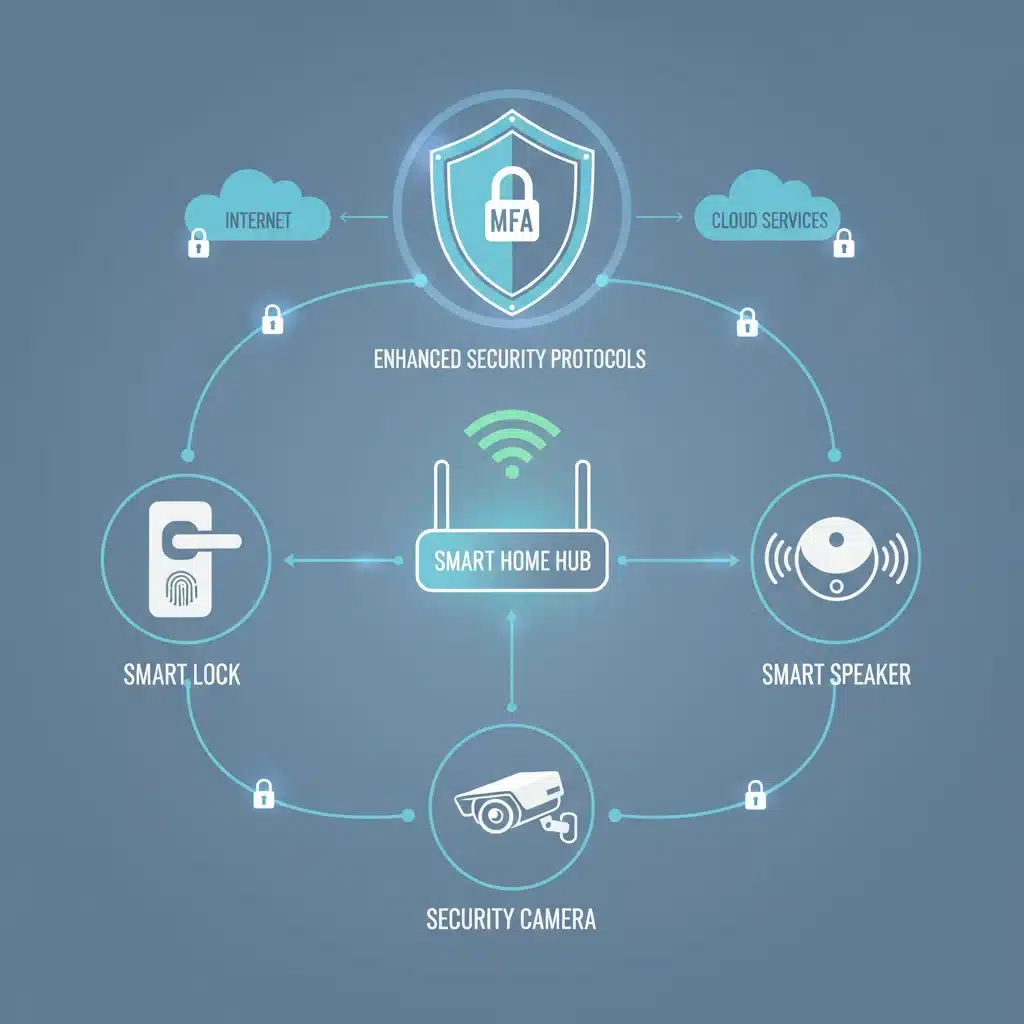
In the context of a smart home, MFA applies to any device or service that requires a login or authentication. This includes your smart home hub, individual smart devices (locks, cameras, thermostats, voice assistants), and the mobile applications used to control them. The goal is to ensure that only authorized individuals can interact with your smart home, preventing malicious actors from gaining control or accessing sensitive data. The sophistication of smart home devices has increased exponentially, and with it, the potential attack surface for cyber threats. Integrating MFA into your smart home strategy is not just about preventing unauthorized access to your devices; it’s about safeguarding your privacy, protecting your personal data, and maintaining control over your living space. As more aspects of our lives become intertwined with our smart homes, from managing energy consumption to monitoring elderly relatives, the importance of a robust security framework, anchored by MFA, cannot be overstated.
The ‘Factors’ of Authentication
- Knowledge Factor (Something You Know): This is the most common factor and includes passwords, PINs, and security questions. While essential, it’s the weakest link on its own. For your Smart Home MFA Setup, this is typically your login password for your smart home platform or individual device apps.
- Possession Factor (Something You Have): This factor involves an item only the legitimate user possesses. Examples include a smartphone receiving a one-time passcode (OTP) via SMS or an authenticator app, a hardware security key (like a YubiKey), or even a smart card. This is a critical component of modern MFA.
- Inherence Factor (Something You Are): This refers to biometric data, unique to the individual. Fingerprint scans, facial recognition, iris scans, and voice recognition fall into this category. Many modern smartphones and some smart home devices now incorporate these biometric capabilities, making them excellent candidates for a seamless Smart Home MFA Setup.
By combining at least two of these factors, even if a cybercriminal manages to steal your password, they would still need access to your physical device (possession factor) or your unique biometric data (inherence factor) to gain entry. This significantly raises the bar for attackers, making your smart home a much less appealing target. The evolution of smart home technology also means that MFA implementations are becoming more user-friendly and integrated. While early MFA solutions could sometimes feel cumbersome, today’s options are designed for seamless integration into your daily routine, often requiring just a tap on your phone or a quick biometric scan. This balance of security and convenience is key to widespread adoption and effective protection.
Step 1: Inventory Your Smart Home Ecosystem and Assess MFA Compatibility
The first crucial step in any effective Smart Home MFA Setup is to gain a complete understanding of your current smart home landscape. You can’t secure what you don’t know you have. This involves creating a comprehensive inventory of all your connected devices and services. Don’t just think about the obvious ones like smart speakers or security cameras; include everything from smart light bulbs and plugs to robotic vacuums and smart kitchen appliances. Each device represents a potential entry point into your network, and therefore, a point that needs to be secured.
Creating Your Smart Home Device Inventory
Start by listing every single smart device you own. For each device, note down:
- Device Type: (e.g., Smart Lock, Thermostat, Camera, Hub, Voice Assistant)
- Brand and Model: (e.g., August Smart Lock Pro, Nest Learning Thermostat, Arlo Pro 4)
- Associated App/Platform: (e.g., August Home app, Google Home, Amazon Alexa, Apple HomeKit, SmartThings)
- Connectivity Method: (e.g., Wi-Fi, Bluetooth, Zigbee, Z-Wave)
This inventory will serve as your roadmap for the subsequent steps. It will help you visualize your entire ecosystem and identify potential vulnerabilities.
Assessing MFA Compatibility
Once you have your inventory, the next critical phase is to assess the MFA capabilities of each device and its associated platform. Not all smart home devices or services offer the same level of security features, and some older models might not support MFA at all. This assessment is vital for a robust Smart Home MFA Setup.
- Check Platform/App Settings: For each item on your list, go into the settings of its associated mobile app or web platform. Look for security settings, account protection, or privacy options. Specifically, search for ‘Two-Factor Authentication’ (2FA), ‘Multi-Factor Authentication’ (MFA), or ‘Login Verification’.
- Identify Supported MFA Types: Note down what types of MFA are supported. Common options include:
- SMS-based OTPs (One-Time Passwords)
- Authenticator apps (e.g., Google Authenticator, Microsoft Authenticator, Authy)
- Biometric authentication (fingerprint, facial recognition) via your smartphone
- Hardware security keys (less common for individual smart home devices but sometimes available for central hubs or cloud accounts)
- Prioritize Critical Devices: Not all devices carry the same risk. Prioritize enabling MFA on devices that control physical access (smart locks, garage door openers), monitor your home (security cameras), or store sensitive personal information (smart hubs, voice assistants with purchase history).
- Research and Update: If a device or platform doesn’t seem to support MFA, do a quick online search. Check the manufacturer’s website or support forums. It’s possible that MFA support has been added in a recent firmware update or is available through a specific integration. Ensure all your devices are running the latest firmware, as updates often include critical security patches and new features like MFA.
This assessment might reveal some gaps in your current security posture. Don’t be discouraged if some devices lack MFA; this knowledge is power. It allows you to make informed decisions about potential upgrades or alternative security strategies for those specific devices. Remember, the goal of a comprehensive Smart Home MFA Setup is to minimize your attack surface wherever possible.
Step 2: Consolidate and Centralize Your Smart Home Management
Managing a disparate collection of smart devices, each with its own app and login, can quickly become overwhelming and create security blind spots. A key element of an effective Smart Home MFA Setup is consolidation and centralization. By bringing as many devices as possible under a unified platform, you streamline management, simplify security, and reduce the number of individual points of failure. This also makes it easier to enforce consistent security policies, including MFA, across your entire ecosystem.
Leveraging Smart Home Hubs and Ecosystems
Many modern smart homes are built around a central hub or a major ecosystem. Examples include:
- Google Home/Nest: Integrates with a vast array of ‘Works with Google Home’ devices.
- Amazon Alexa: Connects with countless ‘Works with Alexa’ products and services.
- Apple HomeKit: A secure framework for controlling HomeKit-enabled accessories.
- Samsung SmartThings: A versatile hub that supports multiple protocols (Zigbee, Z-Wave, Wi-Fi).
- Home Assistant: An open-source platform offering deep customization and local control.
The advantage of these centralized platforms is that they often provide a single point of control and, crucially, a single point for security management. If your central hub or ecosystem supports MFA, enabling it there will often secure access to all connected devices managed through that platform. This significantly simplifies your Smart Home MFA Setup efforts.
The Benefits of Centralization for MFA
- Reduced Attack Surface: Instead of securing 20 different logins for 20 different devices, you might only need to secure one or a few central accounts with robust MFA.
- Consistent Security Policies: A central platform allows you to apply uniform security settings, including MFA requirements, across a broader range of devices.
- Simplified Management: It’s easier to monitor for suspicious activity and manage security settings from a single dashboard.
- Enhanced Automation: Centralized platforms often enable more complex automations and routines, which can also be leveraged for security purposes (e.g., if an unauthorized login attempt is detected, trigger an alert and temporarily disable smart locks).
If you haven’t already, consider investing in a robust smart home hub that supports a wide range of devices and has strong security features, including comprehensive MFA options. When choosing a hub, prioritize those that offer multiple MFA methods beyond just SMS OTPs, such as authenticator app support or biometric integration. This step is about creating a strong, unified foundation for your Smart Home MFA Setup, making the subsequent security enhancements far more manageable and effective.
Step 3: Enable MFA on All Compatible Devices and Accounts
With your inventory complete and your smart home management potentially centralized, it’s time to actively implement MFA. This is the operational heart of your Smart Home MFA Setup. This step requires diligent attention to detail, as you’ll be navigating through various apps and settings to activate this critical security layer.
The Activation Process
Go through your inventory list, device by device, and account by account. For each entry that you identified as MFA-compatible in Step 1, follow these general steps:
- Access Security Settings: Open the dedicated app for the device or the central smart home platform (e.g., Google Home, Alexa app, SmartThings app). Navigate to the account settings or security section.
- Locate MFA/2FA Option: Look for options like ‘Two-Factor Authentication,’ ‘Multi-Factor Authentication,’ ‘Login Verification,’ or ‘Account Security.’
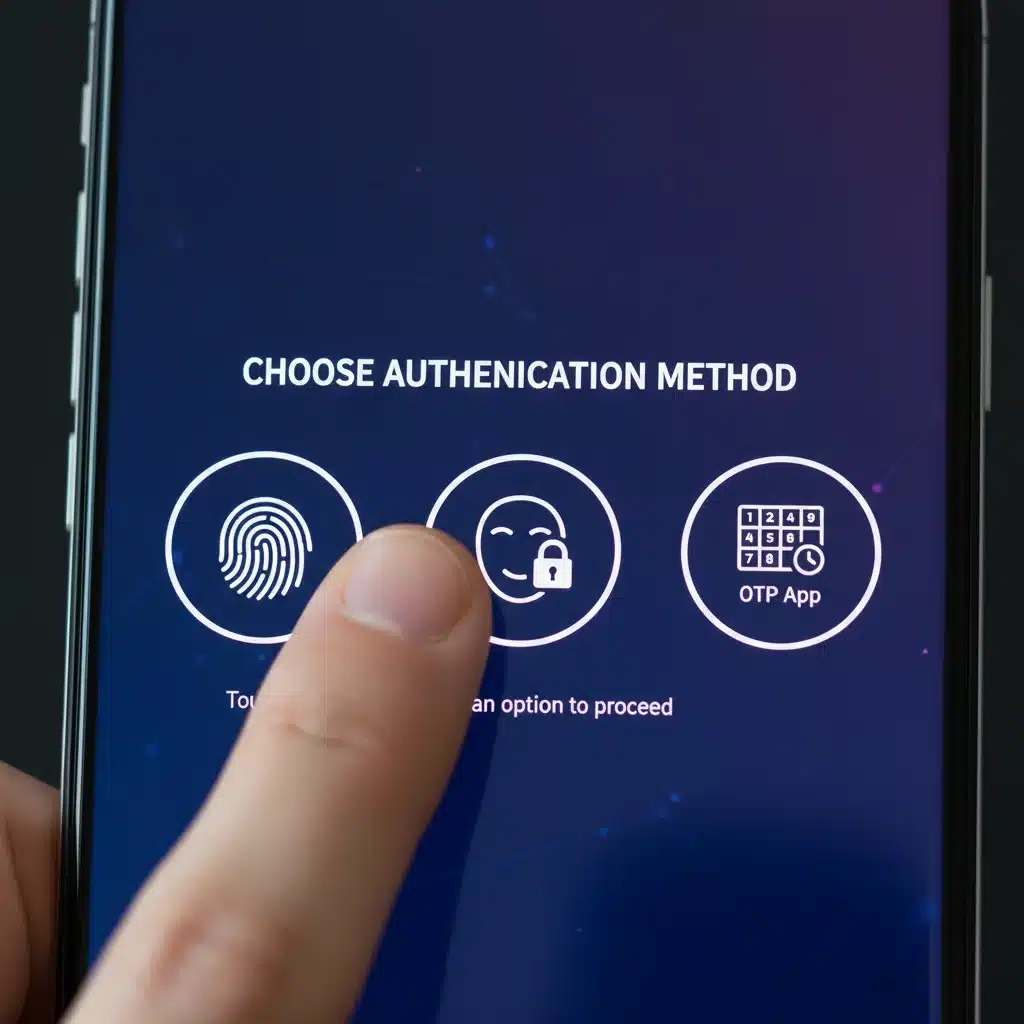
- Choose Your Preferred MFA Method: If multiple options are available, select the most secure and convenient method for you. While SMS OTPs are better than nothing, authenticator apps (like Google Authenticator, Authy, Microsoft Authenticator) are generally more secure as they are not susceptible to SIM-swapping attacks. Biometric authentication (fingerprint, face ID) on your smartphone is often the most seamless.
- Follow On-Screen Prompts: The app will guide you through the setup process. This usually involves scanning a QR code with your authenticator app, verifying a code sent to your phone, or confirming your biometric data.
- Save Backup Codes: Most MFA setups will provide a set of ‘backup codes’ or ‘recovery codes.’ These are crucial! Store them in a secure, offline location (e.g., a password manager, encrypted USB drive, or even a printed copy in a safe). These codes are your lifeline if you lose access to your primary MFA device (e.g., your phone).
- Test the Setup: After enabling MFA, log out of the account and then attempt to log back in. Ensure that the MFA prompt appears and that you can successfully authenticate using your chosen method. This verifies that your Smart Home MFA Setup is working correctly.
Prioritizing MFA Implementation
If you have a large number of devices, it might feel daunting. Prioritize enabling MFA on:
- Your main smart home hub or platform: This is the gateway to your entire ecosystem.
- Devices with physical access control: Smart locks, garage door openers.
- Security and surveillance devices: Cameras, alarm systems.
- Voice assistants: These often have access to personal data, calendars, and even payment methods.
- Any cloud-based accounts: Associated with your smart home (e.g., manufacturer accounts, IFTTT).
Remember, consistency is key. Every account or device that supports MFA should have it enabled. This step is about actively closing potential security gaps and building a robust defense around your smart home. Neglecting even one compatible device could leave an open door for unauthorized access, undermining your entire Smart Home MFA Setup strategy.
Step 4: Implement Strong Password Policies and Regular Audits
While MFA adds a critical layer of security, it doesn’t negate the need for strong, unique passwords. In fact, strong passwords and MFA work in tandem to provide the most robust protection for your Smart Home MFA Setup. This step focuses on establishing and maintaining excellent password hygiene across your entire smart home ecosystem and conducting regular security audits to ensure continued protection.
The Foundation: Strong, Unique Passwords
- Complexity: Use a combination of uppercase and lowercase letters, numbers, and symbols. Avoid easily guessable information like birthdays, pet names, or common words.
- Length: Aim for passwords that are at least 12-16 characters long. Longer passwords are exponentially harder to crack.
- Uniqueness: This is paramount. Never reuse passwords across different accounts, especially for smart home devices. If one service is compromised, a unique password prevents a domino effect across your other accounts.
- Password Manager: The only practical way to manage numerous complex and unique passwords is to use a reputable password manager (e.g., LastPass, 1Password, Bitwarden). These tools generate strong passwords, store them securely, and automatically fill them for you, making your Smart Home MFA Setup more manageable. Ensure your password manager itself is protected by a strong master password and, ideally, MFA.
Regularly updating your passwords, even with MFA enabled, is a good practice. Aim for a password change every 6-12 months for critical smart home accounts, or immediately if there’s any suspicion of a data breach related to a service you use.
Scheduled Security Audits
Cybersecurity is not a set-it-and-forget-it endeavor. The threat landscape is constantly evolving, and so too should your security posture. Regular audits are an essential part of maintaining an effective Smart Home MFA Setup.
- Review Device Inventory: Periodically (e.g., quarterly or bi-annually), review your smart home device inventory. Have you added new devices? Removed old ones? Ensure your inventory is up-to-date.
- Verify MFA Status: For every compatible device and account, confirm that MFA is still enabled and functioning correctly. Software updates or changes in platform settings can sometimes inadvertently disable security features.
- Check for Firmware Updates: Many smart devices receive critical security patches and feature enhancements through firmware updates. Make it a habit to check for and apply all available updates for your devices and smart home hubs.
- Monitor Account Activity: Regularly review the activity logs within your smart home apps and platform accounts. Look for any unusual login attempts, device activations, or changes that you didn’t initiate. Most platforms provide a history of recent activity.
- Strong Password Check: Use a reliable password manager to identify any weak or reused passwords, and update them immediately.
- Assess New Threats: Stay informed about emerging smart home security vulnerabilities and best practices. Tech news sites, cybersecurity blogs, and manufacturer security advisories are good sources of information.
These audits might seem time-consuming, but they are crucial for proactive defense. They allow you to catch potential issues before they become serious security breaches, ensuring your Smart Home MFA Setup remains effective and your digital home stays secure.
Step 5: Educate Your Household and Establish Best Practices
Technology alone cannot provide complete security. The human element is often the weakest link in any security chain. For your Smart Home MFA Setup to be truly effective, every member of your household who interacts with smart devices needs to understand their role in maintaining security. This final step is about education, communication, and establishing clear best practices to foster a security-conscious environment.
Educating Your Family Members
Hold a family meeting or individual discussions to explain the importance of smart home security and MFA. Tailor your explanations to their level of understanding and involvement with the smart home. Key points to cover include:
- The ‘Why’: Explain the risks of unauthorized access (privacy invasion, data theft, physical security breaches) and how MFA helps prevent these.
- How MFA Works: Demonstrate how to use MFA for shared accounts, such as logging into the main smart home app. Show them how to approve login requests or use an authenticator app.
- Password Hygiene: Reinforce the importance of strong, unique passwords and the dangers of sharing them. If using a password manager, teach them how to use it responsibly.
- Phishing Awareness: Educate them about phishing attempts – emails or messages designed to trick them into revealing login credentials or MFA codes. Emphasize never to share codes unless they initiated the login.
- Reporting Suspicious Activity: Establish a clear procedure for reporting anything that seems unusual or suspicious, whether it’s an unfamiliar device appearing in the app or a strange login notification.
Regular reminders and discussions can help embed these practices into daily routines. Make security a shared responsibility within your home, which is fundamental to a successful Smart Home MFA Setup.
Establishing Smart Home Security Best Practices
Beyond MFA, several other best practices will further enhance your smart home’s security:
- Guest Access Management: If you have guests, provide temporary or limited access to specific devices rather than full account access. Many smart home platforms offer guest modes for lights or thermostats.
- Separate Wi-Fi Network for Smart Devices (IoT VLAN): For advanced users, consider setting up a separate Wi-Fi network (a VLAN or guest network) specifically for your smart home devices. This isolates them from your main network where your computers and sensitive data reside. If an IoT device is compromised, it won’t have direct access to your personal devices.
- Regular Software/Firmware Updates: Reiterate the importance of keeping all smart home apps, hubs, and device firmware updated. These updates often contain critical security patches.
- Review App Permissions: Periodically check the permissions granted to your smart home apps on your smartphone. Ensure they only have access to what’s necessary for their function.
- Physical Security: Don’t forget physical security. Ensure your Wi-Fi router is in a secure location, and consider using a strong password for router access.
- Be Mindful of Voice Assistant Data: Review privacy settings for voice assistants and understand what data they collect and how it’s used. Delete voice recordings periodically if the option is available.
- Secure Your Network Router: Your router is the gateway to your smart home. Ensure it has a strong, unique password (not the default), and enable WPA3 encryption if supported. Disable WPS (Wi-Fi Protected Setup) if you’re not using it, as it can be a security vulnerability.
By combining a robust Smart Home MFA Setup with comprehensive household education and diligent best practices, you create a multi-layered defense that is resilient against a wide array of cyber threats. This proactive approach ensures your smart home remains a haven of convenience and security, not a gateway for unauthorized access.